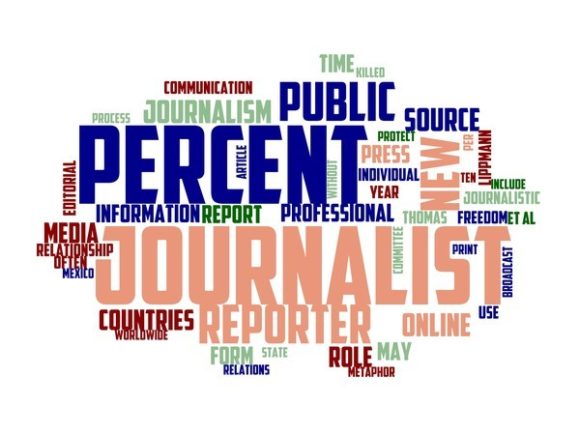
Journalist Typography Wallpaper: Your Hand-Drawn Wordcloud for Real Creative Work
If you've ever stared at a blank notebook cover, a plain tote bag, or a dull product tag wondering how to make it feel human, meaningful, and memorable—you're exactly who Journalist Typography Wallpaper was made for. This isn’t just another digital pattern. It’s a vibrant, hand-drawn wordcloud built from real journalistic language—words like “truth,” “voice,” “clarity,” “impact,” “story,” “integrity,” and “curiosity”—arranged with organic rhythm and colorful warmth.
Unlike sterile vector fonts or generic quote graphics, this wallpaper carries texture, intention, and quiet authority. The letters are drawn—not generated. The colors shift gently (think terracotta, indigo, mustard, sage, and slate), never shouting, always inviting closer looking. And because it’s designed as a seamless, scalable wallpaper, it works equally well on a 4” sticker or a 48” event banner.
Where This Wordcloud Actually Fits Into Real Life
It’s one thing to call something “versatile.” It’s another to see where it solves small but persistent creative problems. Here’s where people are using Journalist Typography Wallpaper—not as decoration, but as functional design fuel:
- Small-batch apparel brands printing it onto organic cotton tees and aprons—giving their products instant narrative weight without needing slogans or logos front-and-center.
- Independent publishers wrapping it around limited-edition poetry chapbooks or journalism zines, turning the cover into a tactile extension of editorial voice.
- Educators and workshop facilitators printing it on large-format posters for media literacy classrooms—students instantly recognize the vocabulary, and the hand-drawn quality makes serious topics feel approachable.
- Crafters and makers using it as a base layer in mixed-media journals, then stitching over key words or collaging news clippings into the negative space.
- Local newsrooms and nonprofit comms teams adapting sections of the wordcloud for digital banners, email headers, or printed program guides—adding visual cohesion across platforms without sacrificing authenticity.
Who Benefits—and How They Use It Differently
A freelance graphic designer might license the Journalist Typography Wallpaper to create a series of press-pass lanyards for a journalism conference—selecting only the words “verify,” “context,” and “listen” to isolate meaning. Meanwhile, a textile artist may scale it down and screen-print fragments onto linen pillow covers, letting the ink bleed slightly for a worn-in, archival feel.
A stationery shop owner uses it to design greeting cards for journalists retiring after decades on the beat—pairing “legacy” and “witness” with soft watercolor washes. A university communications department drops it into a PowerPoint template for faculty workshops on ethical storytelling, making slides feel grounded—not corporate.
Even non-designers find value. Teachers print it on cardstock, cut out individual words, and use them in vocabulary-building activities. Podcasters turn sections into Instagram Story backgrounds when promoting new episodes about press freedom or local reporting. The flexibility isn’t theoretical—it’s baked into how the layers, spacing, and color balance were intentionally composed.
Practical Things to Keep in Mind Before You Apply It
Because this is hand-drawn—not algorithmically spaced—there are subtle things that matter in practice:
- Color mode matters. For fabric printing or packaging, work in CMYK and confirm Pantone equivalents if brand consistency is critical. On-screen RGB looks richer, but physical output can mute certain hues—especially the deeper teals and burnt oranges.
- Scale changes impact readability. At very small sizes (under 1.5”), some delicate letterforms soften or merge. That’s part of its charm—but if legibility is essential (e.g., on business cards or tags), test print a section first, or zoom into a high-res version to extract individual words.
- It thrives with contrast. This wordcloud sings on natural fibers, uncoated paper, matte ceramics, and kraft cardboard. It feels quieter—or even muddy—on glossy finishes or neon backgrounds. Think “newsprint,” not “neon sign.”
- Licensing is purpose-specific. Most versions allow unlimited personal and commercial use—including merchandise—but check whether your intended application (e.g., resale as a standalone digital asset or embedding in SaaS templates) falls under standard terms.
Why It Works Where Other Typography Doesn’t
Generic script fonts often feel decorative but hollow. Bold sans-serifs communicate confidence but rarely warmth. This Journalist Typography Wallpaper lands in the middle: it’s expressive enough to carry feeling, structured enough to support function, and handmade enough to avoid cliché.
You’ll notice it doesn’t shout “inspiration!” or “dream big!”—it leans into substance instead. Words like “edit,” “source,” “anchor,” and “frame” quietly reinforce craft and care. That’s why it resonates with audiences who value depth over dazzle: editors choosing cover art for a quarterly magazine, librarians designing summer reading displays, or advocacy groups creating campaign materials that honor complexity instead of reducing it.
It also avoids trend fatigue. While many typographic assets chase current aesthetics—glitch effects, hyper-minimalism, vaporwave gradients—this wordcloud feels timeless because it mirrors how real journalists actually think: layered, iterative, ethically anchored, visually thoughtful.
Real Projects, Not Just Possibilities
Here’s what’s already happening:
- A Brooklyn-based letterpress studio used the Journalist Typography Wallpaper as background texture behind embossed headlines on a set of civic-engagement postcards—then left the wordcloud partially visible beneath the ink, so each card revealed different phrases depending on lighting.
- A podcast network applied a cropped, monochrome version to vinyl sticker sheets for listener thank-you kits—paired with handwritten notes, the stickers became collectible artifacts of community.
- An indie bookstore in Portland printed it on recycled paper gift tags for books on media ethics and oral history—making the act of gifting feel like a small act of curation.
- A journalism fellowship program embedded a simplified variant into their digital application portal, using animated transitions between words (“investigate” → “amplify” → “reflect”) to guide applicants through each section—turning UX into quiet mentorship.
None of these required custom illustration or months of development. Each started with downloading the file, opening it in familiar software (Illustrator, Affinity Designer, Canva Pro), and trusting the intention already built into the lines and spacing.
When It Might Not Be the Right Fit
That said, it’s honest to name its edges. If your project needs strict typographic hierarchy (e.g., a legal document requiring clear visual distinction between headings and body text), this isn’t a layout tool—it’s a texture and tone tool. If your audience responds better to bold iconography than layered language, or if your brand voice is intentionally playful or futuristic, the grounded, literary feel may sit slightly apart from your goals.
And while it’s highly adaptable, it’s not infinitely neutral. It carries point of view—just as any carefully chosen typeface does. That’s its strength, not a limitation. But it means the best results come when you meet it halfway: honoring its journalistic roots while finding your own authentic way to weave it into what you’re making.